
Follow these simple steps to join our weekly Saturday Social Team Battle Tournament (Rapid 7+3) on lichess.org:
1) Log in to Lichess
- You can register lichess ID for free on the website directly. Or you can ask us and we can assign a new one to the student
- Go to lichess.org and log in with your Lichess ID and password.
2) Access Our Team Page
- Click on the following link to go to our Make Your Move Chess team page: Make Your Move Chess Team Page
- Click on “JOIN Team” on the left if you are not part of the team yet. This requires team approval, but it should be quick once our admin sees the request. (This is a one-time team join request.) The tournament is only open to players who are part of the MYM Team.

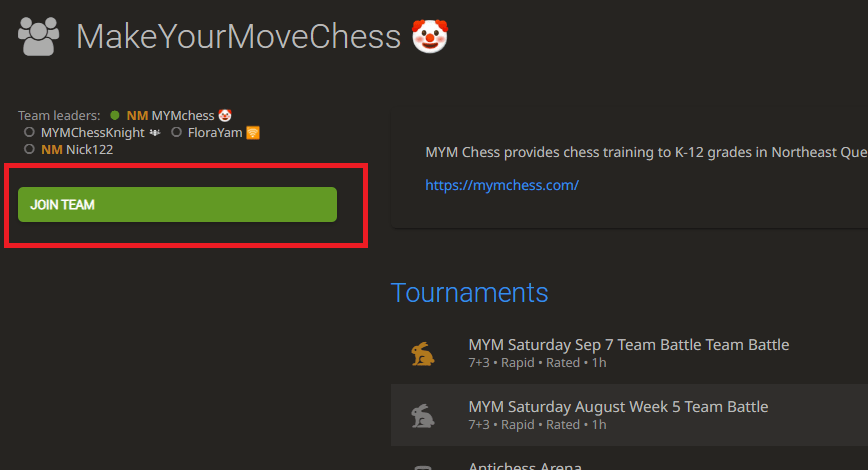
- Once inside, you will see the latest Saturday Team Battle Tournament listed.
3) Join the Tournament
- Click on the Team Battle Tournament listed for the upcoming Saturday.
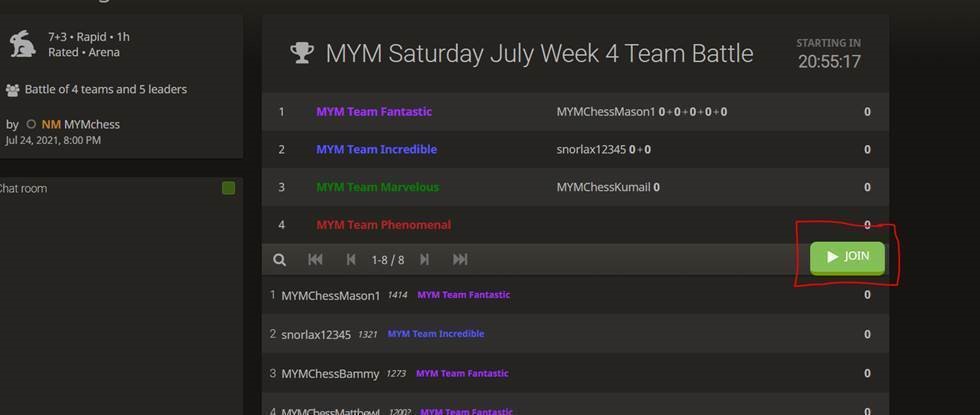
- Once you’re on the tournament page, you will see a JOIN button.


4) Confirm Your Participation
- Click the JOIN button and then OK to confirm. Once done, you’re all set! Pairing will automatically begin at 8 PM.
- After each game, click RETURN TO LOBBY to wait for the next pairing. Pairing will continue until a few minutes before 9 PM, when the tournament ends.

5) Live Scores and Chat
- Live scores will be posted on the lobby page. Feel free to ask any questions or interact with other students in the lobby chat room.
6) Unassigned to Teams?
- If you see a list of teams to choose from after clicking JOIN, this means you have not yet been assigned to a team. Please contact one of our staff for help!
- You can email us or simply ask in the lobby chat, and we will assign you to the correct team.
If you have any questions, feel free to reach out. We look forward to seeing you in the tournament!