Chess Level Assessment on Lichess.org
Thank you for taking the time to complete the chess level assessment with us. Your cooperation helps us provide the best possible evaluation and recommendations for your child. To get started, please follow these steps:
- Log In:
- Please log in to lichess.org using the user ID and password provided to you via email.
- At the Agreed Time:
- Be logged in and ready at the scheduled time.
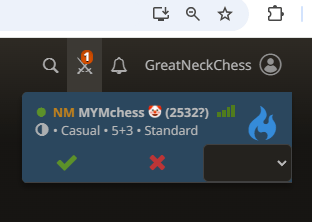
- Wait for a “Challenge Notification”. This will appear as a two-swords icon. (Please see below picture)

- Accept the Challenge:
- Hover your mouse over the two-swords icon to see a YES or NO prompt.
- Click YES to accept the challenge.
- The game will start automatically.
- Assessment Details:
- You will play two games: one with the white pieces and one with the black pieces.
- During the games, our coach will observe various aspects, including your ability to recognize opportunities, patterns, and tactics, as well as your board vision.
- The coach will evaluate your skills in the opening, middlegame, and endgame.
- Post-Assessment:
- After the assessment, we will contact you to provide feedback and recommend suitable classes based on your performance.